

ISS Detector one simple but amazing app
By Danny Silva // February 25, 2013
You know about the International Space Station or ISS. But have you ever seen it, I mean actually see it fly throught the sky? The ISS Detector App will show you when to look up into the night sky to do just that.
So you are thinking great, I get to see the space station but how does that apply to my classroom? I teach kids during the day. Sure we can send them all home to look up at the sky and report back the next day, but this app can be so much more.
Let's start off with the basics of the app. Even using this app for just its most basic functionality, I am impressed with the layout and information provided. The screen provides you with three areas: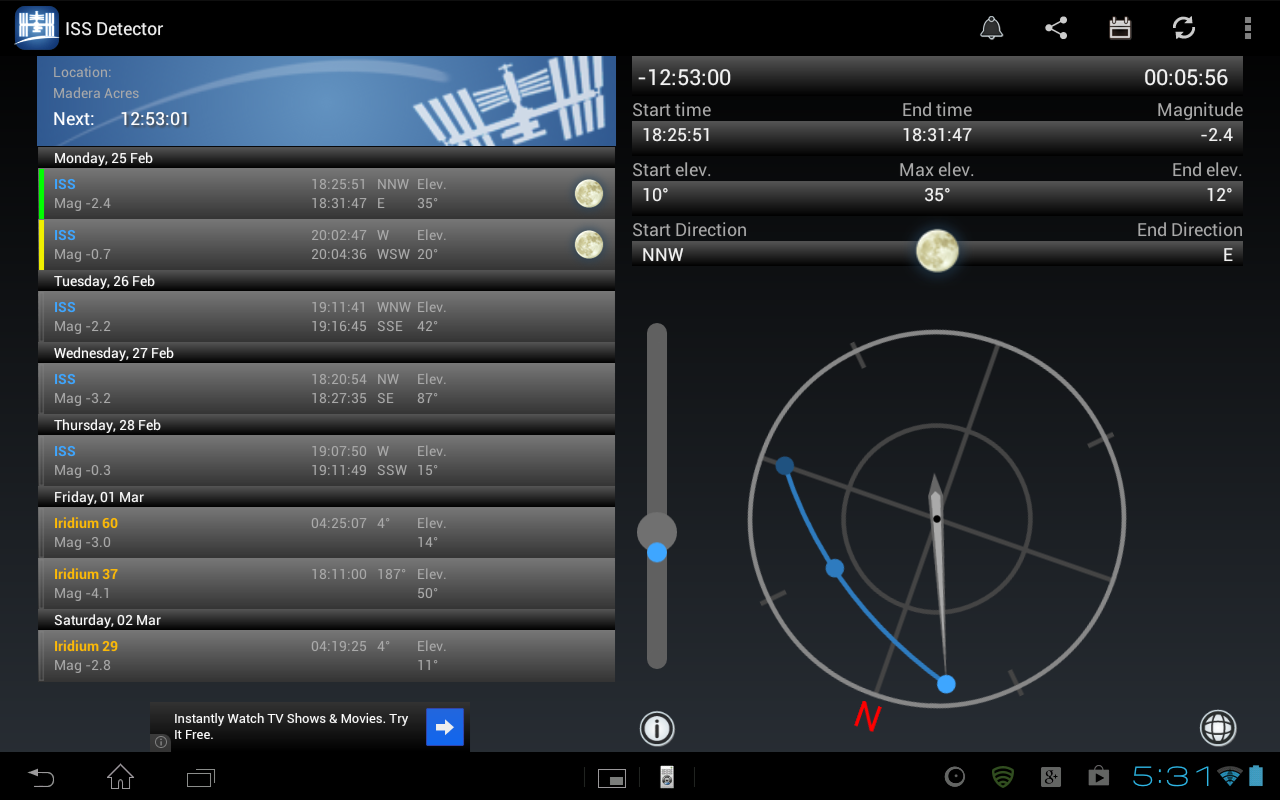
Upcoming sightings, information about the next event, and a compass.
In the upcoming area you will see the date, time, Magnitude (brightness, more on that later), degrees, and elevation. Select an event by tapping on it and see more information in the other two areas.
In the more information area, you will be see an expanded version of the information. including: Count down to the event, Duration of the event, Start time, End Time, Magnitude, Starting Elevation, Max Elevation, End Elvation, Start Direction, Weather during the event, and End Direction.
With the compas you will see a line (or a single dot) with three dots. The first dot is the starting point, the second dot (in the middle) will show when it is the brightest, and the last dot is the ending point. Next to the compass is a place to figure out the max elevation. You can change the angle of the device to "point" to where the brightest point (max elevation) will occur.
Ok, now that you know a little bit about the app lets get back to how you can use this in your classroom. Of course there is the obvious talk about space but lets take it further. Here are just a few ideas that I can think of:
Use it to start a discussion about living in space. Have students then research what it takes to do just that. Design a project for them to show off what they have learned.
Use it in Math class to talk about angles and degrees of a circle.
Use it in Physics class to talk about the properties of light and reflection or about gravity and what it takes to stay in orbit.
In an upper level Math class figure out the angle the ISS is in relation to the Sun at its peak reflection.
Discuss the mathimatics involved to determining where and when someone on the ground can see the flare from a satellite (another feature of the app).
The last reason to use the app inside and outside of the classroom: When you can count down from 10 to see a satilite flare in the sky for your kids (even your spouse) they will think that is pretty cool.
Sony's Education Ambassadors volunteer their time and knowledge to Sony in the pursuit of helping educators adapt to new technology in the classroom. Each SEA member was provided a Sony Xperia™ Tablet to evaluate, to help them better understand the device’s features.
About The Author

Danny Silva
Danny is formally an Agriculture Teacher, Technology Coordinator and Administrator. He is the Professional Development Coordinator for Computer-Using Educators, a Google Certified Teacher, a Google Apps Education Certified Trainer and a Microsoft Innovative Educator. He has led multiple Google Teacher Academies around the world as part of CUE's Lead Learner team and as the Director...
VIEW PROFILE


